
Written by Bryant Gan, Founder, Niagawan · Last updated 10 September 2026
If you run a shop in Malaysia and you are looking at retail POS systems, you are really asking three questions: which one fits a shop like mine, what will it actually cost me to get running, and how do I avoid buying the wrong thing. This guide answers those in that order.
The short answer
A kedai runcit, a boutique and a hardware shop do not need the same system. Work out your shop type first (section 1), then the realistic setup cost (section 2). On cost, plan for two things: the software at RM 797 a year, and the equipment you buy once. A counter starting from nothing usually lands around RM 2,700 in the first year, then RM 797 a year after that. Section 2 breaks it down.
This is written for owners — kedai runcit, minimarts, boutiques, hardware shops, and anyone running more than one outlet — who are buying a point-of-sale system for the first time, or replacing one that has stopped keeping up. No jargon: where a term is unavoidable, it is explained in the same sentence.
01. Which Retail POS Suits Your Shop
“Retail” is not one business. A kedai runcit selling tinned food and drinks, a boutique selling clothes, and a hardware shop selling screws by the piece have genuinely different problems at the counter. Buying the system built for someone else's shop is the most common and most expensive mistake here.
Find your row. Note what you can safely ignore — that is where most of the wasted money goes.
| If this is your shop | What you actually need | What you can skip for now |
|---|---|---|
| Kedai runcit / minimart tinned goods, drinks, snacks | Barcode scanning so the counter moves fast, a receipt printer, and a cash drawer | Anything built around appointments or table service |
| Boutique / clothing lower volume, higher value | A way to handle one product sold in several options — the same shirt in different sizes or colours — plus sales-by-staff so you know who sold what | A high-speed scanning counter — you have time per customer |
| Hardware shop many similar-looking items | Item codes you can trust, so the right screw at the right price rings up | Fancy customer displays |
| More than one outlet | One system you can reach from anywhere, rather than a separate setup per shop | Buying a second, unconnected system for shop two |
Two things every one of these shops needs, whatever the type: the system must keep working when the internet drops, and the sales must reach your accounts without anyone re-typing them at closing time. Those two are covered in sections 3 and 8.
Supermarket And Grocery — Where The Needs Change
A supermarket is a minimart with the volume turned up, and volume changes which things matter. Two lanes running at once means more than one receipt printer. Hundreds of customers a day means barcode scanning stops being a convenience and becomes the only workable way to run a counter. And with several staff on shift, knowing who rang up what stops being nice-to-have.
The buying logic does not change — it is the same list as a minimart, with speed and staff tracking weighted much more heavily.
02. What A Retail POS Setup Costs In Malaysia
Most guides dodge this. Here is the honest shape of it: you are paying for software each year, plus equipment once. The equipment is usually the bigger surprise, because vendors quote the software price and leave the terminal out.
The order to think about it in:
- The software. Niagawan PosPro is RM 797 a year and includes 4 users — barcode scanning, shift tracking, sales-by-staff, support for more than one printer, offline mode, and Niagawan accounting behind the counter.
- The equipment. Bought once. What you need depends on your counter — section 4 ranks it.
- Year one, all in. Software plus equipment together. That is the number to compare quotations against.
- Every year after. The software again, at RM 797.
Niagawan's own prices, as a concrete example you can measure other quotes against. All prices exclude SST.
| What you are buying | Price | What it is |
|---|---|---|
| PosPro | RM 797 / year | 4 users. Barcode scanning, shift tracking, sales-by-staff, more than one printer, offline mode, and full accounting behind it with SST support |
| iMin Falcon 1 terminal | RM 1,600 once | The counter machine itself |
| iMin Swan (dual screen) | RM 1,800 once | Second screen faces the customer |
| Bluetooth barcode scanner | RM 200 once | |
| WiFi receipt printer | RM 400 once | Bluetooth printer is RM 100 |
| Cash drawer (4-slot) | RM 100 once | |
| Extra user | RM 100 / user / year | Beyond the users included |
| SST features add-on | RM 200 / year | Only if your business charges SST |
A Minimart Starting From Nothing — The Real Total
Say you are opening a minimart with one counter and no equipment at all. A realistic first year:
- PosPro software — RM 797
- iMin Falcon 1 terminal — RM 1,600
- Bluetooth barcode scanner — RM 200
- Cash drawer — RM 100
About RM 2,700 in year one, of which RM 1,900 is equipment you buy once. Year two is the RM 797 software again, assuming nothing breaks — so the scary number is a first-year number, not your yearly cost. If you already own a tablet you are happy to keep at the counter, the terminal comes off that total; ask us what your existing device can run before you buy new hardware.
When you compare quotes, always separate the two: a low yearly software price with a compulsory expensive terminal can easily cost more than the reverse. For a full breakdown of what each piece of equipment does and what to look for, see what a scanner, printer and cash drawer each cost.
03. One Sale, End To End
If you have never used a POS, here is the whole thing, start to finish — a customer buying a tin of milk at your counter.
| Step | What happens at the counter |
|---|---|
| 1. Scan the item | You point the scanner at the barcode. The right item and the right price appear on screen — nobody keys in a number, so nobody keys in the wrong number. Items without a barcode are picked from the on-screen list instead. |
| 2. Take payment | Cash, card or e-wallet. The drawer opens for cash. |
| 3. Print the receipt | The receipt prints at the counter, from the printer you set up. A busy shop can run more than one printer. |
| 4. The sale reaches your accounts | Because PosPro includes Niagawan accounting, the sale does not need to be re-typed into a separate accounting tool after closing. |
Step 4 is the one that separates a POS from a cash register. A cash register tells you what is in the drawer. A POS with accounting behind it means the day's sales are already recorded when you lock up.
And if the internet drops mid-sale? With PosPro you keep ringing up sales with no connection, and everything syncs once the connection is back. This matters more than owners expect — a shop that cannot sell during an outage is a shop that is closed. If your signal is unreliable, make any vendor demonstrate this, not just claim it.
04. The Equipment You Actually Need — And What You Can Skip
You do not need everything on day one. Ranked by how much difference each piece makes in a real shop:
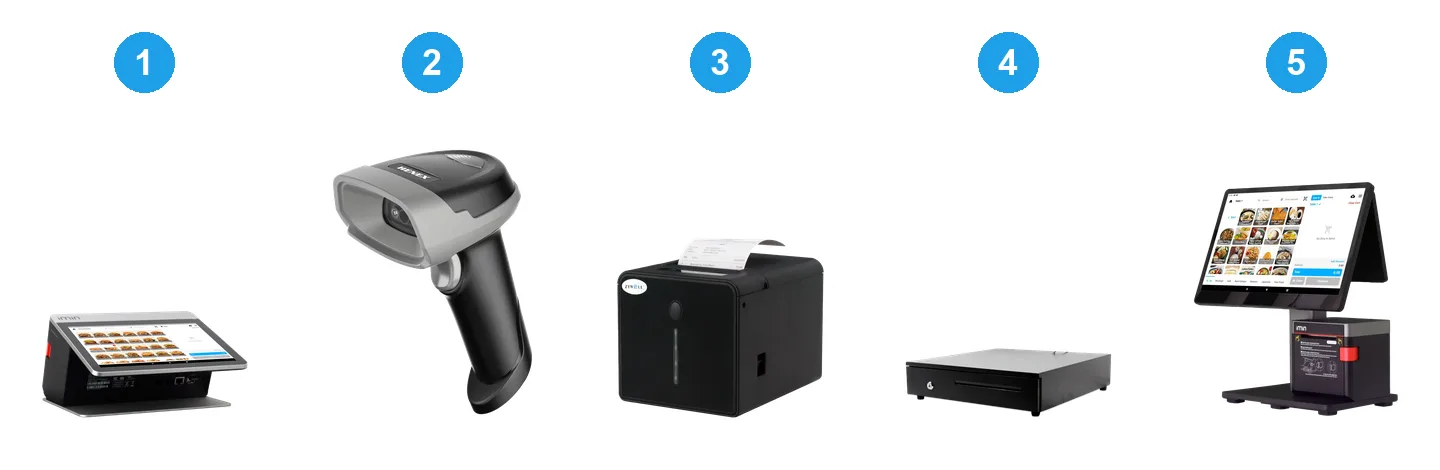
| Equipment | Buy it now? | Why |
|---|---|---|
| Counter terminal (or a tablet) | Yes | Something has to run the POS. A tablet is fine for a small counter; a proper terminal is sturdier for all-day use. |
| Receipt printer | Yes | Customers expect a receipt, and you need one for returns. |
| Barcode scanner | Yes for a minimart, later for a boutique | At RM 200 it is the cheapest speed you can buy — if your items have barcodes. A boutique with 30 customers a day gains less. |
| Cash drawer | Yes, if you take cash | RM 100. Keeps cash secure and the count honest. |
| Customer-facing screen | Later | Nice for trust at a busy counter. Not a reason to delay opening. |
| Second printer | Only with a second lane | PosPro supports more than one printer when you get there. |
One warning worth the paragraph: check what the terminal costs before you commit to the software, and check whether the software will run on hardware you already own. That single question has changed the answer for a lot of shop owners.
05. Keeping Track When You Sell A Lot Of Different Items
A kedai runcit can easily carry several hundred different products. A hardware shop carries a lot of things that look almost identical. The practical problem is not storage — it is finding the right one fast while a customer waits.
Three things make a long item list workable:
- An item code for every product. An item code (sometimes called an SKU) is just the unique code you give each product so the system can tell two similar things apart — a 3-inch screw from a 4-inch screw. Get these right at setup and the counter stays fast forever after.
- Barcodes wherever the item already has one. Most packaged goods arrive with a barcode printed on them. Scanning removes the two slowest steps at the counter: searching, and typing.
- Categories. Grouping items — drinks, snacks, cleaning — means staff can find the unbarcoded ones without scrolling through everything you sell.
One Product, Different Options
A boutique hits this on day one. You do not sell “a shirt” — you sell that shirt in S, M and L, in three colours. Entering all nine as nine unrelated products means nine things to keep straight, and no easy way to see how the shirt is doing overall.
The tidier answer is variants: one product, with its options underneath it. Niagawan V4 supports product variants. If this matters to your shop, say so when you talk to us, because it is a V4 capability — check what your current plan covers before you count on it.
A kedai runcit or hardware shop rarely needs this. A 3-inch and a 4-inch screw are genuinely different items, not two options of one thing — and each carries its own stock figure, which is what you want when you are checking the shelf.
What to do before you buy: take your hardest item — the one you always struggle to find — to the demo, and ask the salesperson to add it and ring it up while you watch. How long that takes tells you more than any feature list.
06. Knowing What To Reorder And What You Owe Suppliers
Two things quietly cost retail shops money, and they are different problems.
Running out without noticing. The item sells well, the shelf empties on a Friday, and nobody realises until a customer asks.
Here is what the system can genuinely give you, stated plainly so you can hold us to it. Niagawan V4 keeps stock levels per outlet, records stock movement (what came in, what went out), lets you make stock adjustments when the shelf and the system disagree, and gives you a stock ledger — the history of an item, so you can see how fast it actually moves rather than guessing.
That answers “what do I have, and how quickly is it going?” — which is what tells you when to reorder.
Two things we will not pretend. We do not claim the system sends you a low-stock warning — if a vendor promises alerts, make them show you the actual notification, not a settings screen. And ask any vendor plainly whether ringing up a sale changes the stock number by itself, or whether someone updates it; the answer changes how much work the system saves you. Ask us the same question.
Losing track of what you still owe suppliers. When stock arrives before the payment goes out, it is easy to lose track of who has been paid. Niagawan Plus, which comes with PosPro, includes AP ageing — a report of the money you still owe each supplier and how long it has been outstanding. That is the part we can point you to directly.
Ask this at every demo. Purchasing features vary a lot between systems, and the words vendors use for them vary even more. Rather than trusting a feature list, ask to see the exact screen where you would record a delivery from your supplier — and whether that is included in the price you were quoted, or an add-on.
07. Running More Than One Shop
The moment you open a second outlet, one question decides how much admin your week contains: is it one system, or two?
Two separate setups means two item lists to maintain, two sets of records, and no single place to look. Niagawan PosPro manages multiple outlets from one dashboard, so a second shop joins what you already have instead of starting again.
The part that actually changes your week is the reporting. Niagawan supports multi-outlet reporting, so you can review how each outlet is performing inside the same system — rather than treating every branch as a disconnected business and stitching the picture together yourself at month end. If one shop is quietly sliding, you see it where you already work instead of finding out later.
Ask any vendor to show you that view on screen before you buy, so you know exactly what you will be looking at.
Before you commit, get three specifics in writing from any vendor — these are where the surprises live:
- Is there a per-outlet fee? Some systems charge per shop, some per user. PosPro includes 4 users; extra users are RM 100 per user per year.
- Exactly which reports can you see across outlets, and which are per shop? Ask to be shown on screen. Do not accept “yes, you can see everything” as an answer.
- Do the shops share one item list, or does each keep its own?
08. Where Your Sales End Up
This is the part that decides whether your POS saves you a job or creates one.
With a POS that only handles the counter, the day ends and the numbers are still trapped in it. Someone — you, usually, at night — re-enters them into whatever you use for accounts. Every re-typing is a chance to get it wrong, and by the time an error surfaces the receipts are gone.
PosPro is POS and Niagawan accounting together in one subscription: sales, expenses, financial reports, bank reconciliation, and SST support in the same system that runs your counter. There is no second tool to buy and nothing to re-key after closing.
If SST applies to your business, the SST features add-on is RM 200 a year. Whether SST applies to you depends on your business and turnover — check your own position rather than assuming, and note the prices above exclude SST.
One Malaysian thing worth asking about while you are choosing: e-Invoice. A shop counter is the awkward case — you ring up a lot of small sales and most customers just want their receipt and to leave.
The practical shape of it with Niagawan: the counter keeps issuing normal receipts as usual, and those sales can then be combined into one consolidated e-Invoice and submitted monthly, in one click, rather than you handling each little sale separately. That is the part worth checking against any quotation, because doing it by hand is exactly the job you do not want at month end. See how Niagawan handles e-Invoice.
Whether and when e-Invoice rules apply to your business depends on your own circumstances — confirm your position rather than assuming. And if a customer does want their own e-invoice at the counter, ask any vendor to show you that happening before you sign.
09. Score Any Retail POS Before You Pay
You will see a lot of “Top 10 POS systems” lists. They rarely tell you which is right for your shop. This is more useful: take these ten to any demo, from us or anyone else, and mark each one yes or no. A system that cannot score 8 is not ready for a real shop.
| # | Ask them to show you | Yes / No |
|---|---|---|
| 1 | Ring up a real sale, start to finish, while you watch the clock | |
| 2 | Pull the plug on the internet mid-sale — does it keep selling? | |
| 3 | Add your most awkward item and sell it | |
| 4 | Show where you would see what is running low | |
| 5 | Show where you would see money you still owe suppliers | |
| 6 | Show today's sales split by staff member | |
| 7 | Show what reaches your accounts, and what still needs typing | |
| 8 | The full price: software, terminal, printer, scanner, add-ons | |
| 9 | Whether it runs on hardware you already own | |
| 10 | Who answers the phone when the counter stops on a Saturday |
Numbers 4, 5 and 7 are the ones owners skip and later regret. They are also the questions that separate a POS from a POS with real accounting behind it.
Run Your Retail Shop On One System
- A retail POS at the counter and full Malaysian accounting behind it — in one PosPro system.
- Barcode scanning, shift tracking and sales-by-staff, so you know what sold and who sold it.
- Works offline and syncs when the connection returns — SST-ready and e-invoice-ready.
10. Getting Started With Niagawan PosPro
PosPro is RM 797 a year and includes 4 users — the POS at your counter and Niagawan accounting behind it, in one subscription. Barcode scanning, shift tracking, sales-by-staff, support for more than one printer, offline mode so you keep selling when the connection drops, and full accounting with SST support.
Niagawan has served 40,000+ Malaysian businesses since 2016 and holds a 4.7★ Google rating across 500+ reviews. If you want to see whether it fits your shop, the fastest route is to send us what you sell, how busy your counter gets, and what equipment you already own — and we will tell you honestly what your setup would cost and whether it is worth it.
Still deciding what kind of system you need at all? See how retail, F&B and service POS differ before you decide. Running food alongside the shop? If you also run a kopitiam or cafe, the needs change — tables, kitchen tickets and split bills. And if what you really want is to check sales from home, if you need to check sales from outside the shop covers how cloud POS works.
Frequently Asked Questions
How Much Does A Retail POS System Cost In Malaysia?
Two parts: the software each year, and the equipment once. Niagawan PosPro is RM 797 a year and includes 4 users plus full accounting behind the counter. Equipment is the part owners underestimate — a counter terminal is RM 1,600 to RM 1,800, a barcode scanner RM 200, a receipt printer RM 100 to RM 400, and a cash drawer RM 100. A minimart starting with nothing typically spends about RM 2,700 in year one, then RM 797 a year after that. Prices exclude SST.
Is There A Free Retail POS System?
Free POS apps exist and can work for a market stall or a brand-new shop. The trade-offs are that most are POS-only with no accounting behind them, are not built for Malaysian SST or e-invoice, and cap out as you grow. For a shop that is genuinely growing, a paid all-in-one built for Malaysia often costs less over a year once you count the manual work a free tool leaves you with.
Do I Need A Barcode Scanner For A Retail POS?
For a kedai runcit or minimart, yes — most of what you sell already has a barcode printed on it, and scanning removes the two slowest steps at the counter: searching for the item and typing the price. At around RM 200 it is the cheapest speed you can buy. A boutique serving 30 customers a day gains much less and can pick items on screen instead. PosPro supports barcode scanning.
Will A Retail POS Keep Working If The Internet Drops?
It should, and you should make the vendor prove it. Niagawan PosPro has offline mode built in — you keep ringing up sales with no connection, and everything syncs once the connection is back. If your shop signal is unreliable, ask for this to be demonstrated rather than described.
Can One System Handle More Than One Outlet?
Niagawan PosPro manages multiple outlets from one dashboard, so a second shop joins the setup you already have rather than starting again. Niagawan also supports multi-outlet reporting, so you can review how each outlet is performing in the same system instead of treating every branch as a separate business. Before you commit, ask any vendor whether there is a per-outlet fee, and to show you the outlet view on screen.
How Will It Help Me Know What Stock I Have And What To Reorder?
Niagawan V4 keeps stock levels per outlet, records stock movement in and out, lets you adjust the figure when the shelf and the system disagree, and gives you a stock ledger — the history of an item, so you can see how fast it really moves instead of guessing. That is what tells you when to reorder. Being straight with you: we do not claim the system sends a low-stock warning, and you should ask any vendor — us included — whether ringing up a sale changes the stock number by itself or whether someone updates it.
Can It Handle The Same Product In Different Sizes Or Colours?
Yes — Niagawan V4 supports product variants, so one product can carry its options underneath it instead of you entering every size and colour as a separate product. This matters most for boutiques and clothing shops. It is a V4 capability, so check what your current plan covers when you talk to us. A kedai runcit or hardware shop rarely needs it — a 3-inch and a 4-inch screw are genuinely different items.
Do I Need Separate Accounting Software As Well?
Not if you choose POS and accounting together. PosPro includes Niagawan accounting in the same subscription, so there is no second tool to buy and nothing to re-type after closing. If you buy a POS that only handles the counter, budget for the accounting tool and the time to move numbers between them.
What Should I Check Before Buying A Retail POS?
Ask for a live demo and watch ten things: a full sale start to finish, what happens when the internet is cut mid-sale, adding your most awkward item, where you see what is running low, where you see money still owed to suppliers, sales split by staff, what reaches your accounts automatically, the total price including equipment and add-ons, whether it runs on hardware you own, and who answers the phone on a Saturday.