
Busy Stall? Keep Every Sale on Record
Niagawan PosPro is a POS system with accounting built in, for hawker stalls and food trucks. Tap the order on the screen and each sale is recorded, cash or e-wallet.
How Much Did You Sell Today?
At peak hour, orders, cooking and payments all happen at once. Cash goes into the tin, and QR payments go to your phone. There is no time to write anything down.
The queue moves slowly.Every order waits until someone is free to take it.
Cash and QR payments are hard to track.At closing, you can't tell how much came in by cash and how much by QR.
Ingredients cost more, your price stays the same.Without purchase records, you can't see your profit shrinking.
No sales record to show.If anyone asks how the stall is doing, there is nothing on paper.
Hard to Know What the Stall Really Makes
The market run, gas, packaging and petrol are paid in cash and never written down, so the stall's profit has never been worked out. You can't tell which menu item sells best either.
Take the Order, and the Sale Is Recorded
Niagawan PosPro runs on the iMin Falcon 1, a counter terminal that fits on a stall. No big counter is needed.
Tap the Order
Your menu and prices are on the screen. Tap what the customer orders.
Print the Receipt
The iMin Falcon 1 has a built-in receipt printer.
Mark the Payment
Cash, DuitNow QR or e-wallet, marked on each sale.
Check Your Sales
The sales are in the system when you pack up.
See How PosPro Works
All of this comes with Niagawan PosPro.
Take Orders on One Small Terminal
Your menu and prices are on the screen. Tap an item to record the order.
- No big counter or separate printer needed
- Orders are recorded even when several come at once
Let the Queue Order by QR
Stick a QR code at the stall. Customers scan it and pick from your menu, and you accept the order in the POS before you start cooking.
- Included in Niagawan PosPro, not a paid add-on
- Fewer misheard orders, because customers choose for themselves
- Customers can order while you cook
Check the Takings When You Pack Up
At closing, the Shift Report shows what should have been collected against what you counted.
- Cash, DuitNow QR and e-wallet are recorded separately
- If the money is over or short, you know the same night
Record the Market Run and Stall Expenses
Ingredient purchases are recorded as Purchase Invoices, whether you have paid for them or not. Gas, site rent and wages are recorded as expenses.
- Recorded purchases appear under Cost of Goods Sold in your Profit and Loss
- Owe a supplier? The unpaid balance stays on record
Know What the Stall Really Makes
The Profit and Loss report shows your sales, the cost of goods you have recorded, your operating expenses and the stall's profit.
- View it by month or by date
- Profit and Loss and Balance Sheet for you or your accountant
- The Product Report shows how much gross profit each menu item makes, when product costs are recorded
Everything a Stall Needs, in One Package
This is the whole set: the software, an iMin Falcon 1 counter terminal with a built-in receipt printer, and a cash drawer.
Niagawan PosPro + Stall Set
Everything below, ready for tonight's service.
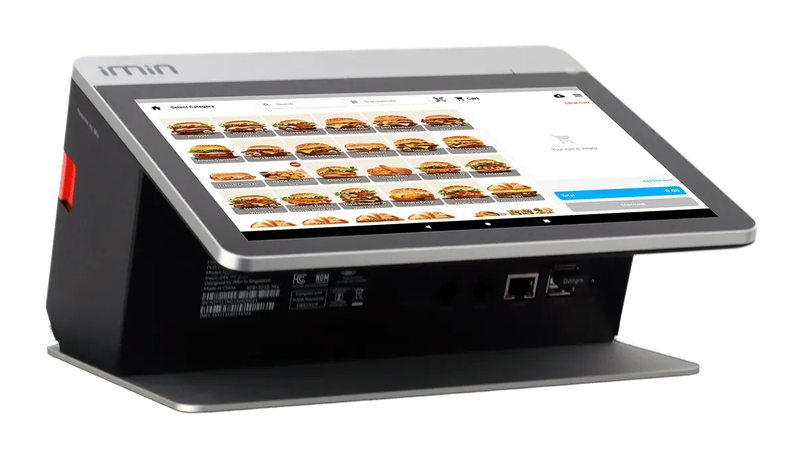
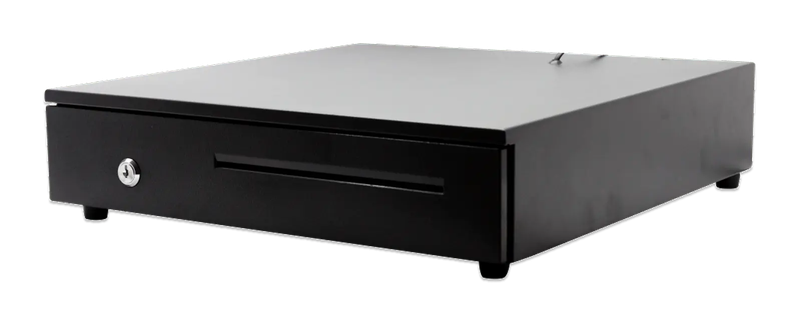
iMin Falcon 1 · Cash drawer (4-slot)
The software — billed yearly
The counter set — bought once
After the first year, you only renew the software RM797 / year
Prices exclude SST. The hardware is yours — bought once, not rented.
14-day money-back guarantee — full refund, no complicated questions. (Software subscription only; hardware excluded.)
What Business Owners Like You Say
“What helps me a lot is tracking records and billing my customers wherever I am. The system is easy and very helpful. If you don't understand, go to the widget and get help from the Niagawan team. Recommended for those who want it easy and simple.”
“I've been using Niagawan since 2021 and overall it's been a great experience. The system is easy to use, even for beginners, and it covers all the essential features to run an online business smoothly. What I like most is how user-friendly it is and how stable the platform has been over the years.”
“An account system that's easy to understand and easy to use. It speeds up every transaction and makes it easier to monitor the check and balance of accounts.”
Questions Owners Always Ask
Do I Pay Every Year?
I Run the Stall Alone. Is It Suitable?
Must I Buy the iMin Falcon 1?
What Happens If the Internet Drops?
Can It See My Food Delivery Platform Sales?
Can I Get a Refund If It Doesn't Suit My Stall?
Looking for Accounting Software or a POS System for Your Business?
Chat with our team on WhatsApp and we will show you how Niagawan fits your business.
e-Invoice included · Unlimited documents · Free WhatsApp support