
Written by Bryant Gan, Founder, Niagawan · Last updated 17 September 2026
If you're looking for an online POS system, you probably want something that records sales at the counter and lets you check the business from anywhere. Before you choose one, a few practical things are worth checking: what happens when the internet goes down, what device you need, and whether your sales, stock and accounts stay connected.
This guide walks through each of those checks in plain terms. No brand names, no "top 10" list. Just what to look at, and how to test it yourself before you pay.
01. What Is An Online POS System?
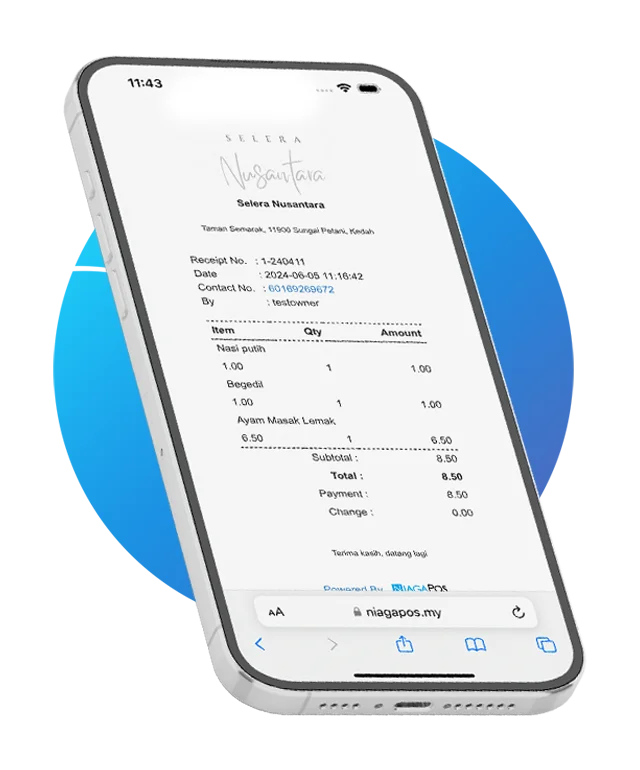
An online POS system (also called a cloud POS) is a point of sale that keeps your sales records online instead of on one computer at the counter. You ring up sales in the shop as usual, and you can check the day's sales from your phone wherever you are. If the counter device breaks, your sales history is still there.
That is the whole idea. The rest of this guide is about the things that decide whether a particular online POS will actually work for your shop. Not sure what kind of POS you need at all? Compare all POS types first. If you are also deciding whether your accounting should be online, see cloud vs desktop.
02. Free Or Paid Online POS: What Actually Changes?
Many online POS apps are free to start. Free is not bad. For a market stall or a new side business, it may be all you need. The differences usually show up in five places:
| What to compare | Free apps often | Paid systems often |
|---|---|---|
| Users and outlets | Limit the number of staff logins, items or outlets on the free plan | Include several users, with extra users or outlets priced clearly |
| Support | Offer a help page or email | Offer someone to contact when the counter stops |
| Accounts | Keep sales inside the app, so someone copies them into the accounts | May include accounting, so sales reach the books without re-typing |
| SST and e-Invoice | May not handle Malaysian SST or e-Invoice | More likely to, if built for Malaysia. Check |
| Limits later | Charge for features once you grow | Show the full yearly price up front. Ask for it in writing |
These are patterns, not rules, so check the actual plan. A simple way to decide: if you run one counter and nobody needs proper accounts from your sales yet, a free app is a fair place to start. If someone is copying sales into the accounts, or you run more than one outlet, a paid system usually earns its fee.
On cost, count two things: the software each year, and any equipment once. As a reference, Niagawan PosPro is RM 797 a year (excluding SST), and you can run it on a phone or tablet you already own. Current prices are on the pricing page.
03. What Happens If The Internet Drops?
This is the worry every owner has about an online POS: if it is online, what happens when the internet goes down at lunchtime?
A good online POS keeps selling offline. The sales wait on the device, and they upload once the connection is back. You don't close the counter, and you don't lose the sales. Niagawan PosPro works this way: you keep ringing up sales with no connection, and everything syncs when the connection returns.
⚠️ Don't take anyone's word for this, including ours. During a demo or trial, turn off the Wi-Fi in the middle of a sale. Finish the sale. Turn the Wi-Fi back on and check that the sale arrived. It takes two minutes and it is the most useful test you can run.
04. Phone, Tablet Or Counter Terminal?
You don't need special hardware to start. Niagawan PosPro runs on a phone, a tablet or a counter terminal. Which one suits you depends on how busy your counter is.
| Device | Good for | Watch out for |
|---|---|---|
| Your phone | A market stall, a pop-up, a small counter with a few sales an hour | A small screen gets slow when there is a queue |
| A tablet | Most small shops. Bigger screen, and you may already own one | Needs a stand and a printer beside it |
| A counter terminal | A busy counter that sells all day | Costs more up front |
You can start on a tablet and move to a terminal when the queue gets longer. Because the sales records are online, changing the device doesn't mean starting again. For printers, scanners, cash drawers and what each costs, see what POS hardware you actually need.
05. What Should Happen After You Make A Sale?
Ringing up the sale is the easy part. What matters is what a connected POS does with it afterwards. Here is what should happen, step by step:
| Step | What you should see |
|---|---|
| 1. Sale | The item and price appear on screen, scanned or tapped, not typed |
| 2. Payment recorded | Cash, card or e-wallet, saved against that sale |
| 3. Receipt | Printed or digital, item by item |
| 4. Stock updated | The stock count for that item changes |
| 5. Sales report | The sale is in today's totals, by item and by how the customer paid |
| 6. Accounting record | If the POS has accounting built in, the sale is already in the books |
Systems handle steps 4 and 6 differently, so these are the two to ask about. Does ringing up a sale change the stock count by itself, or does someone update it? Does the sale reach your accounts, or does someone copy it across after closing? Ask any vendor, us included, to show you both on screen. Don't accept "yes, it can".
06. 8 Things To Test Before Choosing An Online POS
Free or paid, ask for a demo or start a trial, and test these yourself. Each one takes a few minutes.
| # | Test | What a good result looks like |
|---|---|---|
| 1 | Turn off the internet mid-sale | The sale finishes, and it shows up once you reconnect |
| 2 | Make a real sale with your most awkward item | It is quick to find, and the price is right |
| 3 | Check the stock count after the sale | You know whether it changed by itself, or who updates it |
| 4 | Close the day | You can see the day's total and how customers paid, without a spreadsheet |
| 5 | Follow one sale into the accounts | It is already there, or you know exactly who moves it and when |
| 6 | Add a second user and a second outlet | You know what each costs and what the owner can see |
| 7 | Run it on the device you have | It works on your phone or tablet before you buy any hardware |
| 8 | Ask for the year-one price in writing | Software plus equipment plus add-ons, excluding nothing |
If you need SST or e-Invoice, add a ninth: ask to see where they are handled in the same system.
An Online POS That Keeps Selling Offline
- Runs on a phone, a tablet or a counter terminal, so you can start on the device you have.
- Keeps ringing up sales with no connection, and syncs when the connection returns.
- POS and full Malaysian accounting in one PosPro system, RM 797 a year with 4 users.
07. Getting Started With Niagawan PosPro
If you want to check the business from anywhere without the counter going quiet when the Wi-Fi drops, and without a second job at closing time, that is what PosPro is for.
Niagawan PosPro is a POS and full Malaysian accounting in one system, for RM 797 a year with 4 users. It includes barcode scanning, shift tracking, sales by staff, offline mode, and SST support. It runs on a phone, a tablet or a counter terminal. If you run more than one outlet, you can review how each outlet is performing in the same system. Niagawan has served 40,000+ Malaysian businesses since 2016, with a 4.7★ Google rating from 500+ reviews.
- Tell us what you sell and how many outlets you run. We show you the parts that matter for your shop.
- Try it on the device you already have. Run the eight tests in section 6, including the offline test.
- Buy equipment only when you need it. Start on a phone or tablet, and add a terminal when the queue calls for it.
See Niagawan POS, check the current pricing, or WhatsApp us and tell us about your shop.
Frequently Asked Questions
Can POS Be Done Online?
Yes. An online or cloud POS keeps your sales records online instead of on one computer in the shop. You ring up sales at the counter, you can check the day's sales from somewhere else, and a broken device doesn't take your sales history with it.
What Is The Best Online POS System In Malaysia?
There is no single best one. The best one for you is the one that passes the tests for your shop: it keeps selling when the internet drops, handles a real sale quickly, shows you what happens to the stock count, closes the day without a spreadsheet, gets sales into your accounts, prices extra users and outlets clearly, runs on the device you have, and gives you the year-one price in writing.
Is There A Free Online POS System?
Yes, several free POS apps work in Malaysia, and they can be enough for one counter when nobody needs proper accounts from your sales yet. Before you commit, check the limits on users, items and outlets, what support you get, whether sales reach your accounts without being copied by hand, and whether it handles SST and e-Invoice if you need them.
Does An Online POS Work Without Internet?
A good one does. Niagawan PosPro keeps ringing up sales with no connection, and everything syncs once the connection is back. Test it yourself during a demo: turn off the Wi-Fi mid-sale, finish the sale, reconnect, and check the sale arrived.
Can I Use My Phone As A POS?
Yes. Niagawan PosPro runs on a phone, a tablet or a counter terminal. A phone suits a market stall or a small counter. When the queue gets longer, you can move to a tablet or a terminal, and because the records are online you don't have to start again.
How Much Does An Online POS Cost In Malaysia?
Count the software each year and any equipment once. Niagawan PosPro is RM 797 a year with 4 users, excluding SST, and runs on a phone or tablet you already own. If you want a counter terminal, the iMin Falcon 1 is RM 1,600. Current prices are on the pricing page.