Niagawan
POS

Your cosmetics store, from the barcode scan at the counter to which brand actually made you money

Hundreds of SKUs, a dozen brands, one counter. Every sale is scanned, priced right, and lands in your accounts under the brand it belongs to. POS and accounting in one system, not two.

Your cosmetics store, from the barcode scan at the counter to which brand actually made you money
Your day, right now

Many brands on the shelf, and no idea which one carries the shop

A customer puts a serum, a cleanser and two lipsticks on the counter. Your staff checks the sticker on each one, keys the total into a calculator, and writes one line in the sales book. By evening the book says what the day took — but not what it sold.

Shelf space goes by feel, not by numbers.The brand with the prettiest display keeps its shelf. The one quietly selling out gets no more space.

Slow stock quietly expires.Skincare has a date on it. What does not move sits there until it cannot be sold — and that was your cash.

The counter is slow and sometimes wrong.Hundreds of SKUs, promo prices, member prices. A missed sticker means an undercharge — and nobody ever finds out.

Restocking is a guess.You reorder what you remember selling. The agent's bestseller list is his list, not yours.

The shelves are full and the counter is busy. That is not a profit figure.

Sales feel fine because someone is always at the counter. But your money is standing on the shelves — and you cannot say how much of it, in which brand, or how fast it is coming back. The margin on the Korean serum and the margin on the local lip tint are not the same, and nobody has done that arithmetic.

So the real questions stay open. Which brand actually pays the rent? Which one just fills a shelf? What is this month's profit after the stock, the promos and the settlements to brand owners? The sales book cannot answer any of it.

How Niagawan fixes it

Scan, sell, and the brand report writes itself

Every product goes into the system once — barcode, price, brand. From then on the counter scans instead of remembers, and every sale lands in your accounts under the brand it belongs to.

01

Scan the barcode at the counter

The right price comes up, promo included. No sticker, no guessing.

02

Stock counts itself down

Every piece sold comes off the shelf count. You see what moved, brand by brand.

03

The customer pays

Cash, e-wallet or card, recorded per sale.

04

It is already in your accounts

Sales per brand, per product, per day. Nothing to key at month end.

Everywhere else you buy the halves separately — a POS from one company, accounting from another, and neither talks to the other. Or you run a free cashier app, which rings up sales fine, until you ask it which brand made money — and it cannot say.

Inside the system — real screens

Inside the system — real screens

Not promises — the actual screens you use every day.

01 · Counter POS

Hundreds of SKUs, one scan

Scan the barcode at the counter — right price, promo and member price come up instantly. No stickers, no relying on the cashier's memory.

  • Every product recorded once — barcode, price, brand — then the counter just scans
  • Promo and member prices apply automatically on scan, no stickers left behind
  • Every sale deducts stock instantly, by brand and product
  • Counter stays fast even with hundreds of SKUs and a dozen-plus brands
02 · Stock By Brand

One product, one stock count

Counter, TikTok/Shopee/DM orders and the consignment rack share the same stock count — no more selling what's already gone.

  • Every product is recorded by brand, with its own code and cost
  • Counter, TikTok/Shopee/DM orders and the consignment rack all deduct from the same stock
  • Consignment stock from brand owners is recorded separately; the system calculates automatically once it sells
  • TikTok/Shopee/DM orders are entered when received — not an auto-sync from the platform
03 · Purchases & Expenses

Record supplier purchases, margin calculates itself

Every stock purchase from suppliers/brand owners and every expense is recorded as cost — gross margin calculates automatically, not guesswork.

  • Stock purchases from suppliers or brand owners are recorded as cost (COGS), not a guess at month-end
  • Expenses like rent, utilities and delivery are recorded separately from cost of goods
  • Gross margin on every sale is calculated automatically straight from the recorded purchase cost
  • 64.7% of other cosmetics sellers are already using purchase invoices in the system today
04 · Profit & Loss By Brand

Sales, cost and margin, straight into the books

Counter sales, online invoices, purchases and expenses all flow into the same books — profit & loss by brand, ready anytime, no waiting for month-end.

  • Counter sales and online invoices all go into the same books, by brand
  • Gross profit and net profit calculate automatically straight from recorded purchases and expenses
  • Profit & loss by month or by any date you choose, straight from these records
  • See which brand actually makes money, and which just fills the rack
05 · e-Invoice

e-Invoice ready, walk-ins included

Walk-in counter sales without a customer e-Invoice are combined into one consolidated invoice to LHDN — built in, not an add-on.

  • e-Invoice (LHDN MyInvois) is built into the system — FREE, not an add-on
  • Walk-in counter sales without a customer e-Invoice are batched into one consolidated invoice
  • Submission report (approved/pending/cancelled) ready whenever you want to check
  • Ready before your turn comes, not last-minute
What it costs to start

Everything a cosmetics store needs, in one package

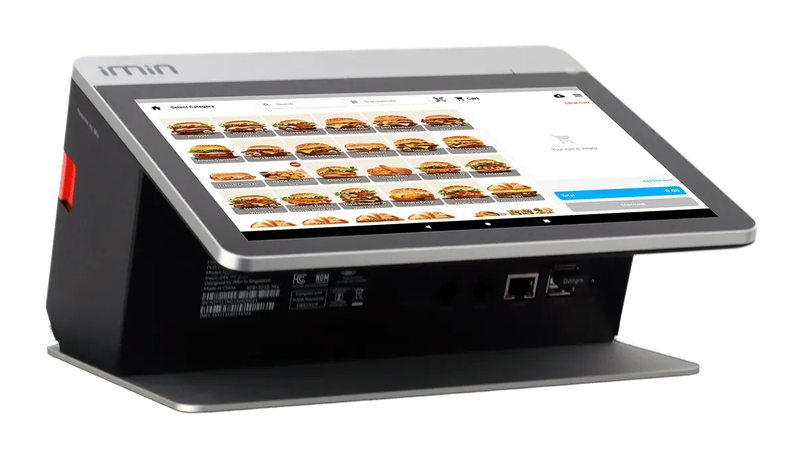
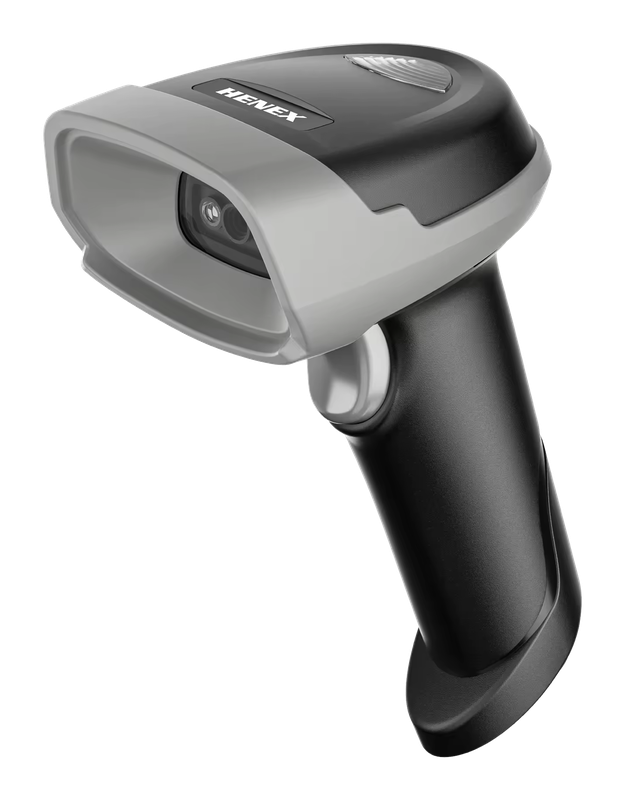
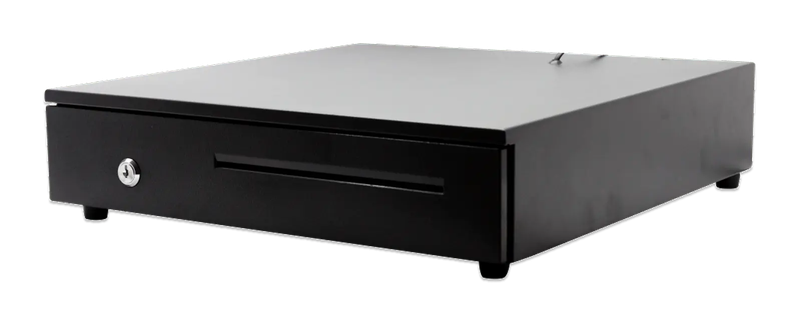
You do not have to work out what to buy. This is the whole set — the software, the counter terminal, the barcode scanner and the drawer.

Cosmetics store package

PosPro 4.0 + counter set

Everything below, ready to scan your first sale.

iMin Falcon 1Bluetooth scannerCash drawer (4-slot)

iMin Falcon 1 · Bluetooth scanner · Cash drawer (4-slot)

The software — billed yearly

PosPro RM797
2 users + your main outlet Included
Barcode scanning Included
Consignment Included

The counter set — bought once

iMin Falcon 1 RM1,600
Bluetooth scanner RM200
Cash drawer (4-slot) RM100
Total to get started RM2,697

After the first year, you only renew the software RM797 / year

Prices exclude SST. The hardware is yours — bought once, not rented.

14-day money-back guarantee — full refund, no complicated questions. (Software subscription only; hardware excluded.)

Google
4.7
500+ Google reviews

What business owners like you say

“Been using Niagawan for over 2 years. Alhamdulillah, it's easy and user-friendly. The system and layout keep improving year after year. Customer service is also quick to respond and easy to deal with.”
ES
EE Station Resources
Google review
“The best accounting system, Niagawan. SBA Pest Solution has used it for 5 years — very satisfied. Very easy for those with no accounting background, and best of all, Niagawan fills in automatically into the LHDN format.”
SA
Shahrin Ahmad
Google review
“Truly a helpful tool that played a big role in bringing my company to this level. Easy to use, effective, and highly beneficial for business growth. Highly recommended.”
SS
Sarawanan Simon
Google review

Questions owners always ask

I have consignment stock from several brands mixed with my own stock — can the system separate them?
Yes — consignment stock is recorded separately from your own stock, by brand. When one sells, the system works out what you owe that brand owner, so month-end settlement is one report, not a guess from memory.
My buy-5-free-1 promos or bundles — does the system calculate cost automatically, without the mistakes of a manual calculator?
Bundles/promos need to be set up once with the right price and cost; after that, every sale uses the same calculation, not a manual recalculation each time. Our consultant helps set up your bundles correctly during the demo, so margin stays accurate.
e-Invoice sends to LHDN automatically — does my income tax go to LHDN automatically too?
e-Invoice (sales submission) goes straight to LHDN MyInvois automatically, including the consolidated invoice for walk-ins without a customer e-Invoice. But income tax filing (MyTax) is still something you do yourself — the system prepares the reports you use for that filing.
I already have my own scanner — do I have to take the full set, and can I pay in instalments?
No — if you already have your own hardware, just use it and only add what you need. If you take the full set (terminal, scanner, cash drawer), it's a one-time purchase and it's yours to keep — there's no instalment option yet, and hardware isn't refundable.
I supply cosmetics stock to several downline shops and get paid after it sells — can the system handle that?
Yes — the stock you supply is treated as the downline shop's until it sells, and the system calculates what they owe you based on sell-through, not payment on delivery. Our consultant confirms how many outlets your package covers and the best setup for your HQ-branch or downline structure during the demo.
WhatsApp

Looking for Accounting or POS for your business?

Talk to us on WhatsApp, we show you how it fits your business.

Chat with us now

All modules included · Free upgrades & backups · Free help on WhatsApp

Niagawan
usually replies in minutes
Can I see a demo first?
Sure! When are you free for a free demo? 😊