
Written by Bryant Gan, Founder, Niagawan · Last updated 4 September 2026
An aging report is a list of every unpaid invoice you are still waiting on, sorted by how long it has been overdue. It groups the money into columns — 0–30 days, 31–60, 61–90 and 90+ — so you can see at a glance which customers are simply slow and which ones have quietly stopped paying.
Most small businesses know roughly how much money is owed to them. Far fewer can say how old that money is — and that is the number that decides whether you can pay your own bills next month. Below you can download a free aging report template in Excel or PDF, see a completed Malaysian example, and learn how to read every column.
Start where you need to
01. The One-Minute Version
Imagine you sell to shops on credit. At the end of September you are owed RM17,325 across eight invoices. That single number tells you almost nothing useful.
Now split it by age:
- RM3,830 is less than a month past due — normal.
- RM5,080 is one to two months late — needs a phone call.
- RM8,415 is more than two months late — nearly half of everything you are owed.
That third line is the whole point. Almost half the money you are counting on has been sitting there for over 60 days, and the longer an invoice sits, the less likely it is ever to be paid. An aging report is simply the table that makes that visible.
The plain-English version of the jargon. Accountants call the money customers owe you accounts receivable, and the people who owe it debtors. The money you owe suppliers is accounts payable, and those suppliers are creditors. That is the only vocabulary you need for this page.
02. Download The Free Aging Report Template
Free, editable, no sign-up. The Excel file is a working spreadsheet, not a picture of one: you type in the invoice date, the payment terms and the amount, and the bucket columns sort themselves out. It also totals every bucket and shows what percentage of your money is already more than 60 days old.
The workbook has four sheets: Debtor Aging (money customers owe you), Creditor Aging (money you owe suppliers), a Worked Example already filled in, and a What To Do sheet with the bucket-by-bucket actions from section 08. Fill in the blue columns only — everything else calculates.
03. Aging Report Example (Malaysia)
Here is the worked example from the download, aged at 30 September 2026. It is a small retailer with eight unpaid invoices — deliberately untidy, because real ledgers are: one customer appears twice, one invoice is barely late, and two have been sitting for months.
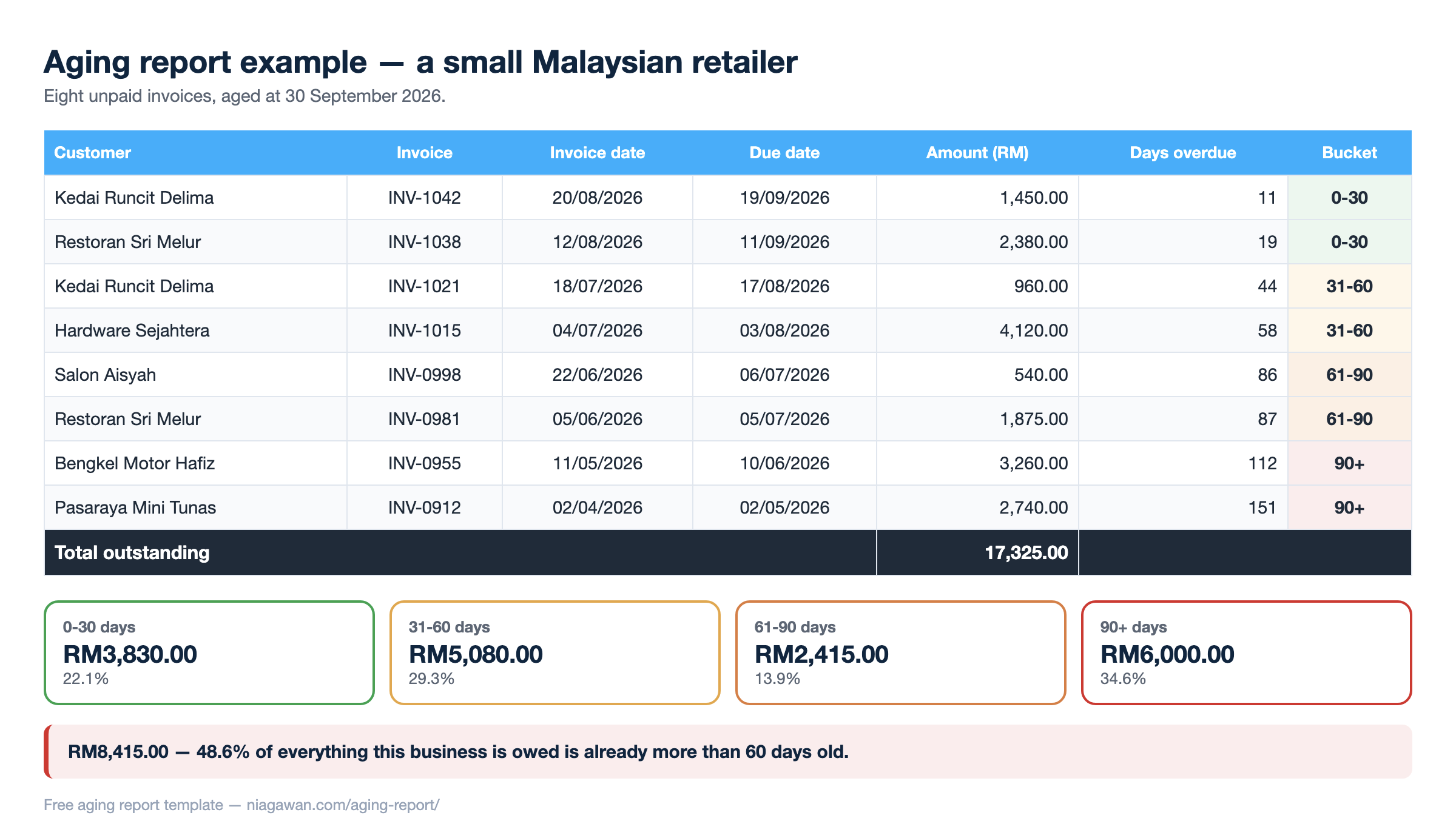
| Customer | Invoice | Invoice date | Due date | Amount (RM) | Days overdue | Bucket |
|---|---|---|---|---|---|---|
| Kedai Runcit Delima | INV-1042 | 20/08/2026 | 19/09/2026 | 1,450.00 | 11 | 0–30 |
| Restoran Sri Melur | INV-1038 | 12/08/2026 | 11/09/2026 | 2,380.00 | 19 | 0–30 |
| Kedai Runcit Delima | INV-1021 | 18/07/2026 | 17/08/2026 | 960.00 | 44 | 31–60 |
| Hardware Sejahtera | INV-1015 | 04/07/2026 | 03/08/2026 | 4,120.00 | 58 | 31–60 |
| Salon Aisyah | INV-0998 | 22/06/2026 | 06/07/2026 | 540.00 | 86 | 61–90 |
| Restoran Sri Melur | INV-0981 | 05/06/2026 | 05/07/2026 | 1,875.00 | 87 | 61–90 |
| Bengkel Motor Hafiz | INV-0955 | 11/05/2026 | 10/06/2026 | 3,260.00 | 112 | 90+ |
| Pasaraya Mini Tunas | INV-0912 | 02/04/2026 | 02/05/2026 | 2,740.00 | 151 | 90+ |
| Total outstanding | 17,325.00 | |||||
Totalled by bucket, that is:
| Bucket | Amount (RM) | Share of the total | What it means |
|---|---|---|---|
| 0–30 days | 3,830.00 | 22.1% | Late, but normally late. Nothing to worry about yet. |
| 31–60 days | 5,080.00 | 29.3% | Slipping. These need chasing this week. |
| 61–90 days | 2,415.00 | 13.9% | Serious. Two months of excuses have already happened. |
| 90+ days | 6,000.00 | 34.6% | At real risk. Some of this may never arrive. |
Read the bottom two rows together. RM2,415 plus RM6,000 is RM8,415 — 48.6% of everything this business is owed is more than 60 days old. A shop owner looking only at “we’re owed seventeen thousand” would never see that. This is the single number worth writing down each month.
04. How To Read The Buckets
Every column counts days past the due date, not days since you issued the invoice. That distinction matters: an invoice raised 45 days ago on 30-day terms is only 15 days overdue, and belongs in the first bucket, not the second.
| Column | What it actually contains | How to feel about it |
|---|---|---|
| 0–30 days | Invoices that have just gone past their due date. | Expected. Most customers pay a little late. |
| 31–60 days | A full extra month has passed with no payment. | This is where a polite reminder stops working and a phone call starts. |
| 61–90 days | Two months late. The customer has had several chances. | Assume it will not fix itself. Escalate to whoever signs the cheques. |
| 90+ days | Three months or more. | Treat as at risk. Stop extending new credit here until it clears. |
Some businesses use 30-day steps, some use 14. The widths matter less than being consistent, because the value of an aging report comes from comparing this month with last month.
05. Debtor Aging vs Creditor Aging
These are the two types of aging report, and they are the same table pointed in opposite directions.
| Debtor aging report | Creditor aging report | |
|---|---|---|
| Also called | AR aging, accounts receivable aging, aged receivables | AP aging, accounts payable aging, aged payables |
| Answers | Who owes me, and for how long? | Who am I about to keep waiting? |
| The money | Coming in | Going out |
| Why you run it | To chase payment in the right order and spot customers turning into bad debt. | To protect supplier relationships and avoid a surprise cluster of bills falling due in the same week. |
| The number to watch | Share of the total sitting past 60 days. | Anything past due at all — suppliers remember. |
Run both. A business can look profitable on paper while its debtor aging quietly stretches and its creditor aging piles up in the same month — which is exactly the squeeze that ends otherwise healthy small businesses. The workbook in section 02 has a sheet for each.
Sometimes the same company turns up on both lists: a customer who is also one of your suppliers. You can then settle the two balances against each other with a contra payment, so only the difference changes hands, and both reports drop by the same amount.
06. The Third One Nobody Explains: Stock Aging
Search for aging reports and you will find receivables, occasionally payables, and almost nothing else. But if you hold physical stock there is a third version worth knowing about: stock aging, sometimes called inventory aging.
Instead of asking how long an invoice has been unpaid, it asks how long an item has been sitting on your shelf. The buckets work identically — 0–30 days, 31–60, and so on — measured from the date the stock arrived.
It matters for the same reason: money that is not moving. A slow-moving invoice and a slow-moving carton are both cash you have already spent and not yet recovered. For anything with an expiry date, stock aging is the difference between selling it at a discount and throwing it away. If tracking what you hold is the wider problem, inventory management software covers that side.
07. The Aging Formula, And How To Build It In Excel
There is no complicated formula behind an aging report. It is one subtraction and one sorting rule.
The aging formula is:
Days overdue = today’s date − the invoice due date
and the due date itself is invoice date + payment terms. An invoice dated 4 July on 30-day terms is due 3 August.
To build it yourself, you need six columns you type in and five that calculate. In the free workbook these are already wired up, but here is what sits behind them if you would rather build your own:
- Due date — add the terms to the invoice date. In Excel, if the invoice date is in C6 and the terms in D6:
=C6+D6 - Days overdue — subtract the due date from today. With today’s date in B3:
=$B$3-E6 - The bucket columns — each one shows the amount only if the days overdue fall in its range. For the 31–60 column:
=IF(AND($G6>30,$G6<=60),$F6,"") - Bucket totals — a plain
=SUM()down each bucket column. - The percentage that matters — the two oldest bucket totals divided by the grand total.
Use =TODAY() for the reference date and the whole sheet re-ages itself every time you open it.
08. What To Do With Each Bucket
An aging report is only worth running if something happens afterwards. The point of sorting by age is that each bucket needs a different conversation — and using the same polite email for a 15-day invoice and a 150-day one is why the 150-day one is still outstanding.
| Bucket | What it means | What to do |
|---|---|---|
| 0–30 days | Not late yet | Send the invoice on the day of the sale, then a friendly reminder a week before it falls due. Most of what ends up in the 90+ column started as an invoice that was simply sent late. |
| 31–60 days | Starting to slip | Call or send a message. Ask two things: did you receive the invoice, and when will it be paid? Get an actual date, not “soon”. |
| 61–90 days | Serious | Go to the person who signs off payments, not the clerk who files them. Ask for a payment date in writing. |
| 90+ days | Danger | Stop giving this customer new credit while it is outstanding. Offer instalments if the relationship is worth keeping, or move it to a formal claim if it is not. |
Chase in order of age, not size. The instinct is to ring the biggest invoice first. But a RM540 invoice at 86 days is in more danger than a RM4,120 invoice at 58 days — and in the example above, the two oldest invoices alone are RM6,000. Work down the right-hand columns first.
09. How Often Should You Run It
Monthly is the minimum; weekly is better if you sell on credit every day.
Run it on the same day each month — the first working day is easiest to remember — and keep the old ones. A single aging report tells you where you stand. Six of them in a row tell you which direction you are heading, and that is far more useful.
The one figure worth tracking month to month is the share of your total sitting past 60 days. If that percentage climbs while your sales stay flat, you are collecting more slowly than you are selling, and the cash squeeze arrives about two months later.
Half Your Money Is Older Than You Think
- Debtor and creditor aging read straight off the invoices you already raised, current the moment you open them
- No second spreadsheet to keep in step with your invoicing
- Cloud accounting and POS built for Malaysian SMEs — 40,000+ businesses since 2016
10. When The Spreadsheet Stops Being Enough
The template on this page works, and for a business with twenty or thirty open invoices it may be all you ever need. It stops working for three reasons, all of them to do with typing rather than arithmetic:
- It is only as fresh as your last update. The report is accurate the day you fill it in, and quietly wrong a week later after four payments have come in.
- Partial payments break the row. A customer pays half of INV-1015. Now the row needs splitting, and the age of the remaining half is a judgement call.
- You are keying the same invoice twice. Once when you issue it, once when you add it to the aging sheet — and the two disagree the first time somebody forgets.
Once invoices live in an accounting system, the aging report is not a document you maintain — it is a view of data that is already there, current the moment you open it. Niagawan Plus (RM497 a year, including three user IDs) includes AR/AP aging alongside digital invoicing, financial reports and bank reconciliation, so the invoice you raise and the aging report you read are the same record rather than two spreadsheets that have to be reconciled.
If you would rather keep the spreadsheet, keep it. The point of section 08 is the chasing, and that works either way.
Bryant Gan is the Founder of Niagawan — the cloud accounting and POS system used by more than 40,000 businesses in Malaysia since 2016. He has spent over 10 years building software that helps Malaysian SMEs keep their books, stock, and tax records in order.
Frequently Asked Questions
What Is An Aging Report?
An aging report is a list of unpaid invoices grouped by how long they have been overdue, usually in 0–30, 31–60, 61–90 and 90+ day columns. It shows not just how much money is outstanding but how old that money is, which is what tells you how much of it is genuinely at risk.
What Is The Aging Formula?
Days overdue equals today’s date minus the invoice due date, and the due date is the invoice date plus the payment terms. Each invoice then drops into the bucket its days-overdue figure falls into. Section 07 shows the Excel version of both steps.
What Are The Two Types Of Aging Report?
Debtor aging (also called accounts receivable or AR aging) covers money customers owe you. Creditor aging (accounts payable or AP aging) covers money you owe suppliers. They are the same table pointed in opposite directions, and section 05 compares them side by side. If you hold stock there is a third version, stock aging, in section 06.
How Do I Create A Debtor Aging Report In Excel?
You need the invoice date, the payment terms and the amount typed in, then three calculated columns: due date (=C6+D6), days overdue (=$B$3-E6) and one column per bucket using an IF formula. The free workbook on this page already has all of it wired up, including the totals and the percentage past 60 days.
Can I Get A Free Aging Report Template?
Yes — the Excel workbook and both PDFs on this page are free with no sign-up. The workbook has four sheets: a debtor aging sheet, a creditor aging sheet, a filled worked example and a bucket-by-bucket action table.
How Often Should I Run An Aging Report?
Monthly is the minimum, and weekly is better if you sell on credit daily. Run it on the same day each month and keep the old copies — the trend across several months is more useful than any single report.
How Do I Check My Debtors’ Aging?
List every unpaid customer invoice with its due date and amount, work out how many days past due each one is, then sort them into age buckets and total each bucket. The template on this page does the sorting and totalling for you once the invoices are entered.
What Does Aging Mean In Accounting?
Aging simply means measuring how long something has been outstanding. Applied to invoices it measures how long they have gone unpaid; applied to stock it measures how long an item has been sitting unsold. In both cases it is a way of finding money that is not moving.
What Is A Good Percentage To Have In The 90+ Day Column?
There is no universal benchmark, and any figure quoted as one should be treated with suspicion. What matters is your own trend: compare this month against the last few. If the share sitting past 60 days is climbing while sales stay flat, you are collecting more slowly than you are selling.
Does An Aging Report Count Days From The Invoice Date Or The Due Date?
From the due date. An invoice raised 45 days ago on 30-day terms is only 15 days overdue, so it belongs in the 0–30 bucket. Counting from the invoice date instead makes everything look worse than it is and hides the invoices that are genuinely late.